Author: techversatile2025@gmail.com

  • Bike Tracker in Pakistan: How to Stop a Motorcycle Being Taken

    Bike Tracker in Pakistan: How to Stop a Motorcycle Being Taken

    A bike tracker is a small GPS device fitted out of sight on a motorcycle. It reports the bike’s position to an app on your phone, warns you when the bike moves without you, and on the better systems lets you cut the engine remotely so a thief cannot ride it away. This guide covers what these devices do in Pakistani conditions, what separates a useful one from a cheap one, and what to check before you buy.

    Why a bike needs different protection from a car

    A motorcycle is the easiest vehicle on the road to steal. It can be lifted by two people, pushed away silently, or loaded into a pickup in under a minute. A steering lock slows that down; it does not stop it. And once the bike is out of sight there is usually nothing left to trace.

    That is the gap a tracker fills. It does not prevent the theft. What it does is remove the part thieves rely on, which is the bike disappearing without anyone knowing where it went.

    What a GPS tracker for bike actually does

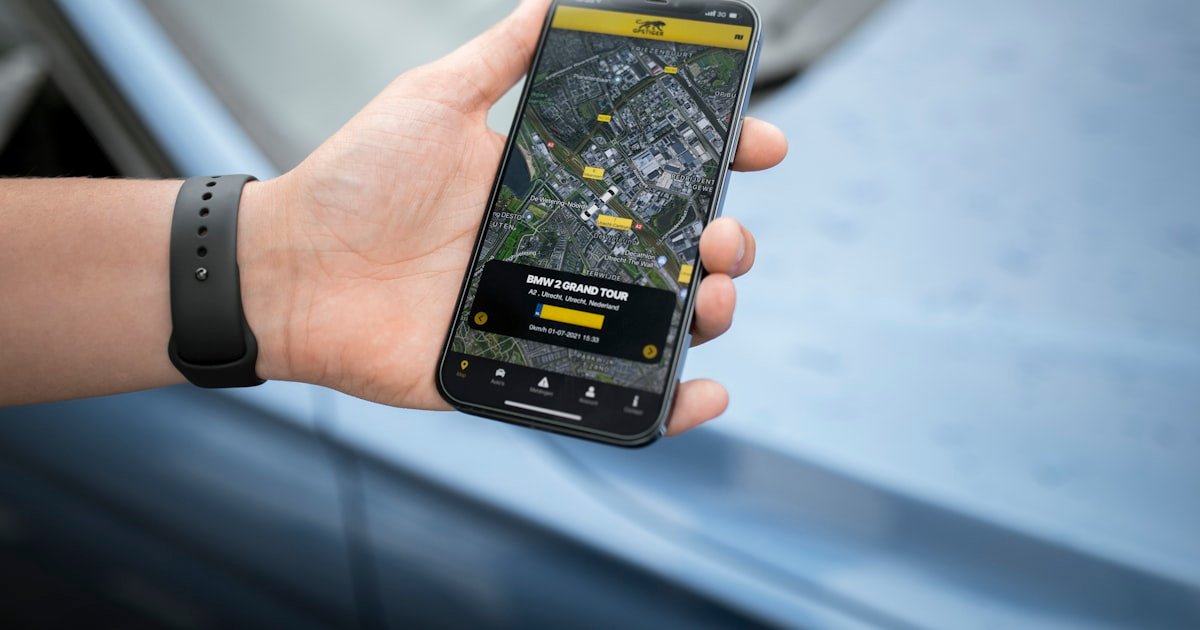
    • Live location. The bike’s position on a map, updating every few seconds while it moves.
    • Movement alert. A notification the moment the bike moves while it should be parked. This is the feature that matters most, because it reaches you while the bike is still nearby.
    • Remote engine cut. On a hardwired device, the ability to stop the engine from the app so the bike cannot be ridden further.
    • Tamper and power alerts. A warning if someone disconnects the battery or interferes with the device.
    • Ride history. A record of every trip, which settles arguments about where a shared or a delivery bike has been.

    Where the tracker is fitted decides whether it works

    This is the part most buyers skip, and it is the part that decides whether the device does its job.

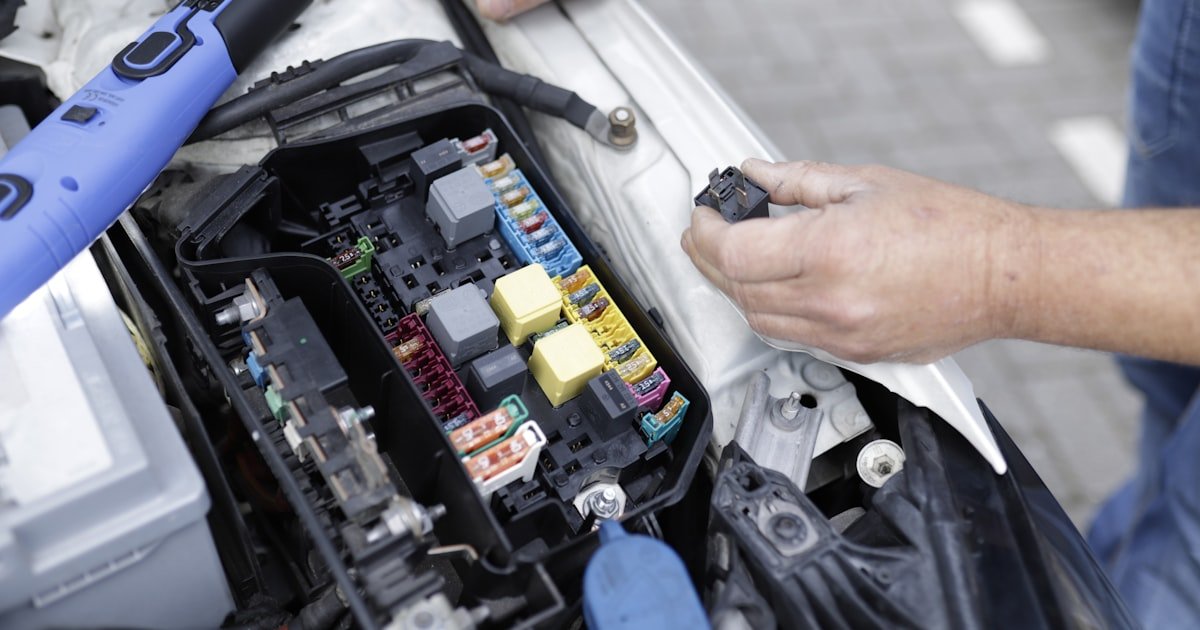
    A tracker that plugs into an accessible socket or sits under the seat in plain view is found and removed in the first minute, usually before the bike has left the street. A hardwired unit, fitted into the loom somewhere that takes tools and time to reach, keeps reporting while the thief is still moving.

    When you buy, ask where the device will be fitted and who fits it. An installer who does this daily hides it somewhere different from the obvious place. If the answer is that you fit it yourself in a few minutes, you are buying location history, not theft protection.

    Bike tracker or bicycle tracker

    These are two different products, and the words get mixed up. A motorcycle tracker draws power from the bike’s electrical system and runs indefinitely. A bicycle has no power to draw, so a bicycle tracker runs on its own battery and has to be charged, which limits how small and how hidden it can be. If you are protecting a motorcycle, a device built for one is the right choice.

    What to check before you buy

    • Does it work on any bike? A 70cc commuter, a 125, a heavy bike and a scooter all take the same kind of device. A seller who only supports certain models is selling around a limitation.
    • How fast is the movement alert? An alert that arrives ten minutes later is a record, not a warning.
    • Is there remote engine cut, and is it fitted properly? The feature is only real if the wiring behind it was done by someone who knew the bike.
    • Who answers when something breaks? A device with no support behind it goes quiet at some point and nobody tells you.
    • Does the SIM and platform cost continue? The device is one part of the price. Ask what the ongoing cost covers and for how long, so you are comparing whole quotes rather than hardware.

    The last point is worth taking seriously, because quotes in this market are rarely comparable as given. What a GPS tracker really costs in Pakistan breaks a quote into its parts so two of them can be read side by side.

    What happens when a bike is actually taken

    The order matters, and it is worth deciding before you need it rather than during.

    1. Open the app and confirm the bike is moving. Alerts do get triggered by someone shifting a parked bike.
    2. Cut the engine if the bike is on a road and you can see where. Doing it in traffic is not sensible; doing it once the bike is stationary or on a quiet stretch is.
    3. Call the police and give them the live location, not the last known one. A position that updates while they move is a different conversation from an address where the bike used to be.
    4. Do not go after the bike yourself. A tracker is there so that someone with the authority to recover the bike knows where it is.

    Delivery riders and small rider fleets

    If the bikes are earning, the same device answers a second set of questions. Which rider has which bike, how long a delivery actually took, whether a bike sat idle for an hour, and how it is being ridden. A rider fleet on one screen turns a stack of individual disputes into a record anyone can check.

    The setup is the same as a single bike; only the reporting changes. Tracking a last mile delivery fleet covers what that looks like day to day.

    Installation and support in Pakistan

    A tracker is a physical fitting, so where it is done matters as much as what is fitted. Fleetile installs in Karachi with its own team, and arranges Lahore, Islamabad and Rawalpindi on request. The fitting takes under an hour, and the device goes somewhere a person looking for it would have to work to reach.

    If you are in Karachi, GPS tracker installation in Karachi has the local detail, including which areas we cover. For the device itself and what the app shows, see the Fleetile bike GPS tracker.

    Frequently asked questions

    What is the best GPS tracker for bike in Pakistan?

    There is no independent ranking of trackers in Pakistan, so any page claiming a number one is claiming it about itself. Judge on four concrete things instead: whether the device is hardwired and hidden rather than plugged in somewhere obvious, how quickly the movement alert reaches your phone, whether remote engine cut is included and properly wired, and whether the company installing it answers the phone afterwards.

    How much does a bike tracker cost?

    The price is made of the device, the SIM, the installation and the platform, and sellers quote different combinations of those, which is why two quotes rarely compare directly. Ask for all four parts and for how long each is covered. Fleetile quotes per bike once we know the model and whether you want engine cut.

    Can a thief find and remove the tracker?

    Anything fitted to a bike can be removed given enough time, which is the point of hiding it well. A device sitting in an obvious place is found immediately. A hardwired unit buried in the loom takes tools and daylight, and while the thief is looking for it the device is still reporting and you have already been alerted.

    Does the bike tracker work if the battery is disconnected?

    You get an immediate power disconnect alert, which on a parked bike almost always means someone is interfering with it. That alert is often more useful than the tracking itself, because it reaches you while the bike is still where you left it.

    Can I stop my motorcycle remotely if it is stolen?

    Yes, on a system that includes remote engine cut and has been wired for it. You open the app and the engine will not restart. Use it when the bike is stationary or on a quiet road rather than in moving traffic.

    Will a tracker work anywhere in the city?

    Anywhere with a view of the sky and mobile coverage, which is almost everywhere outdoors. Underground parking and the inside of a container are where positions go quiet, and that is normal rather than a fault. The device resumes reporting when the bike comes back out.

    Is a bike tracker the same as a bicycle tracker?

    No. A motorcycle tracker runs off the bike’s own electrical system and never needs charging. A bicycle has no power to give, so a bicycle tracker carries its own battery and has to be charged regularly, which makes it larger and harder to hide.

    Can I track more than one bike on the same account?

    Yes. The same app handles one personal bike or a whole rider fleet, with each bike on the same map and reports covering all of them. Nothing changes about the device or the fitting; only what the account shows.

    See it on your own bike

    The quickest way to judge any of this is to watch it working rather than read a feature list. Get a Fleetile demo, or ask us for a quote for your bike and we will tell you what the fitting involves before you commit to anything.

  • Telematics in a Car: What It Records and Who Sees It

    Telematics in a Car: What It Records and Who Sees It

    Telematics in a car is the system that records what the car is doing and sends it somewhere else. A small unit reads position from satellites, adds what the vehicle itself reports about speed, engine state and driving, and transmits both over a mobile connection to software someone can read. The word covers three quite different situations, and most of the confusion around it comes from mixing them up.

    The short answer

    Three separate things get called car telematics, and which one you mean changes everything about who owns the data and what it is for.

    • The manufacturer’s built-in system. Fitted at the factory, reporting to the carmaker. It powers breakdown assistance, service reminders and the brand’s own app.
    • Insurance telematics. A device or phone app fitted for an insurer, which scores driving to set a premium. Often called a black box policy.
    • Fleet or owner telematics. An aftermarket device reporting to a platform you control, so you can see the car on a map, get alerts and pull reports.

    They use the same underlying technology. They answer to different people. If you want the mechanics of how a record travels from the vehicle to a screen, see how telematics works; for the term in general, see what telematics is.

    What a car telematics system actually records

    Position is the part everyone expects. It is the smaller half of what the system knows.

    Data Where it comes from What it is used for
    Position, speed, heading Satellite receiver in the device Live map, journey history, stolen vehicle recovery
    Ignition on and off Power line or vehicle data Separating a parked car from one idling
    Harsh braking, acceleration, cornering Motion sensor Driving scores, insurance pricing, coaching
    Engine hours, fault codes, fuel level The car’s own diagnostic connection Servicing by real use, spotting faults early
    Mileage, split by trip Position over time Business against private mileage, expense claims

    The last two rows are the ones that separate a real telematics setup from a plain tracker. A device with no connection to the car’s own systems can tell you where it went, never how the engine is doing. That distinction is covered in telematics versus GPS tracking.

    Factory-fitted telematics: useful, and not yours

    Most cars sold in the last few years leave the factory with a telematics unit already installed. It is genuinely useful. It calls for help after a serious impact, tells the dealer a service is due, and drives the app that unlocks the doors from a phone.

    What it does not do is give you the data. It reports to the manufacturer, on the manufacturer’s terms, into the manufacturer’s app. For one car that is fine. For a business running five cars of three different brands it means three apps, three logins, three formats and no single view of anything, which is the point at which people start looking for something else.

    There is usually no route from a factory unit into an independent platform, so an aftermarket device is not duplicating it. The two answer different questions for different people.

    Insurance telematics and black box policies

    The second meaning, and for many drivers the first one they meet. An insurer fits a device or asks you to run an app, scores how you drive, and prices the policy on the result. Scoring usually rests on speed against the limit, harsh braking and acceleration, cornering, time of day and total mileage.

    Two things are worth knowing before signing up. The score is built from the same motion data any telematics device produces, so a badly mounted device or a car shared between drivers can produce a score that is not really about you. And the data belongs to the insurer for the life of the policy, which is a different arrangement from a device you fit yourself.

    It is the same technology as fleet telematics with a different owner and a different purpose. Nothing more mysterious than that.

    Telematics for a company car or a small car fleet

    The third meaning is the one businesses ask about, and the requirements are specific enough to be worth listing separately from vans and trucks.

    • Private against business mileage. The single most requested feature on car fleets, because it decides expense claims and tax records. It needs a way for the driver to mark a trip, not just a map.
    • Driver identification. A pool car used by six people produces six people’s driving under one vehicle unless a fob or a login separates them. Worth settling before anyone builds a driver league table.
    • Mixed brands on one screen. This is usually the reason the factory system is not enough.
    • Grey fleet. Staff using their own cars for work is the hardest case, because the vehicle is not yours to wire into. A plug-in device that removes cleanly is the honest answer.

    For the operational side of running these, see how to track company vehicles and writing a company vehicle policy.

    Which device suits a car

    Cars have more options than commercial vehicles because almost all of them carry a diagnostic port.

    • Plug-in (OBD). Fitted in seconds, removed in seconds. Right for a leased car, a pool car, a rental or an employee’s own vehicle. Wrong if theft protection is the reason you are buying, because it sits in the cabin where anyone would look.
    • Hardwired. Hidden, harder to remove, and the only option if you want remote immobilisation. Right for an owned car that stays for years.
    • Phone app only. No hardware, so no engine data and nothing at all when the phone is off or left behind. Insurers use it; it is thin for anything else.

    More detail in telematics devices explained and OBD2 trackers.

    Privacy, and the conversation worth having first

    Car telematics gets resisted more than truck telematics, and usually for a reasonable cause: a car often carries a private life as well as a working day. Systems that treat both the same tend to be quietly disabled or resented.

    Two settings do most of the work. A private-trip switch that lets a driver mark a journey as personal, and hours-based reporting so an employer is not looking at weekends. Both are ordinary features rather than concessions, and introducing tracking with them already configured is a very different conversation from introducing it without. See tracking and staff privacy.

    What car telematics does not do

    • It cannot report data an older car never publishes. Fuel level and fault codes come from the vehicle’s own systems, and a car that does not expose them cannot be made to.
    • It cannot listen. No standard telematics device has a microphone. That belief is common and worth correcting directly when introducing it to drivers.
    • It cannot tell who was driving without a fob or a driver login.
    • It cannot work with no sky view. Underground parking is where positions go quiet, and that is normal rather than a fault.

    Frequently asked questions

    What is telematics in a car?

    A system that records where the car is and what it is doing, then sends that record somewhere else over a mobile connection. It combines satellite positioning with data from the car’s own systems and a motion sensor, and the result is a live map, a journey history and a set of alerts or scores.

    What is car telematics used for?

    Three main things: breakdown and servicing features from the manufacturer, insurance pricing based on how the car is driven, and fleet or owner tracking for location, mileage records and theft protection.

    Do all new cars have telematics?

    Most cars sold recently include a factory-fitted unit, but it reports to the manufacturer rather than to you, and there is usually no way to bring that data into an independent platform. That is why businesses running several brands still fit their own devices.

    What is the difference between car telematics and a GPS tracker?

    A GPS tracker reports position. Car telematics reports position plus what the car and the driver are doing, including engine data, harsh braking and mileage split by trip. Every telematics system contains a tracker; the reverse is not true.

    Is telematics in a car the same as a black box?

    A black box policy is one use of car telematics, where an insurer scores driving to set a premium. The technology is the same as any other telematics device; the difference is who owns the data and what it is used for.

    Can telematics track a car when it is stolen?

    Yes, provided the device is not the type sitting visibly in the cabin. A hidden hardwired device keeps reporting position, and on many systems the engine can be immobilised remotely so the car cannot be driven further.

    Does car telematics record conversations?

    No. A standard telematics device has no microphone. It records position, motion and vehicle data only.

    Can I separate private trips from business trips?

    Yes, on any platform built for company cars. The driver marks a journey as private and it is excluded from business reporting, which is what makes mileage records and expense claims usable.

    See it on your own car

    The quickest way to judge any of this is to watch it running rather than read a feature list. Get a Fleetile demo and see what the Fleetile platform reports from a car, from live position through to the trip history.

  • Oil and Gas Fleet Tracking: Journey Safety, Speed and Compliance

    Oil and Gas Fleet Tracking: Journey Safety, Speed and Compliance

    Few fleets work harder or further from help than the ones that serve oil and gas. Light vehicles cover long distances between sites on roads that are often unmade, heavy units haul equipment and water, and a large share of the work happens where there is no supervision, patchy mobile coverage and no quick way to reach someone who gets into trouble. Oil and gas fleet tracking exists to close that gap: to know where every vehicle is, to know that the people in them are safe, and to be able to prove both to a client who requires it.

    Why oil and gas fleet tracking is different

    Most industries track vehicles to control cost. Energy fleets track vehicles to control risk first and cost second, and that changes what the system has to do.

    The distances are longer, so a vehicle that stops reporting is a genuine concern rather than an inconvenience. The roads are worse, so speed limits on lease roads exist for rollover risk rather than traffic. The work is often solo, so a driver who does not arrive needs to be noticed by something other than the next person expecting them. And the contracts usually carry health and safety obligations that have to be demonstrated with records, not described in a meeting.

    The underlying platform is the same one any fleet uses. What differs is which parts carry the weight: journey monitoring, speed and fatigue management, and an auditable record.

    The problems it solves

    Lone workers on long journeys

    A vehicle travelling several hours to a remote wellsite is the industry’s most ordinary and most exposed situation. Journey monitoring turns it into something visible: the expected route and arrival time are known, the vehicle reports as it goes, and a stop that lasts longer than it should, or an arrival that does not happen, raises an alert rather than passing unnoticed until someone calls.

    This is the part that most often justifies the whole system internally. It is not about productivity. It is about someone knowing, within minutes rather than hours, that a vehicle is not where it should be.

    Speed and driving standards on lease roads

    Unmade access roads are where the serious incidents happen, and they are the least supervised part of the network. Setting a speed limit for a defined area and being alerted when it is exceeded turns a rule in an induction pack into something measurable. Driver scoring built from harsh braking, acceleration, cornering and speeding gives supervisors specific events to coach against instead of a general warning that changes nothing.

    Fatigue and hours behind the wheel

    Long shifts and long drives combine badly. Trip records show actual time behind the wheel and actual rest between journeys, which is the difference between a fatigue policy that is written down and one that can be checked. It also removes the argument, because the hours come from the vehicle rather than from a timesheet filled in afterwards.

    Fuel loss in remote locations

    Fuel is drawn a long way from any office, often into equipment that is not itself tracked. Comparing fuel drawn against distance actually travelled, per vehicle, is the only practical way to see a pattern. Idling reports catch the other half of the loss: units left running for hours because switching off is inconvenient. Our guide to reducing fuel theft covers what to do once a discrepancy appears.

    Proving compliance to clients and auditors

    Operators increasingly require their contractors to demonstrate journey management and driving standards, not simply assert them. Exportable trip histories, speed records and driver scores turn an audit from a scramble into a report. The same records settle disputes about when a vehicle arrived on site and how long it was there.

    Key features for energy fleets

    Feature Why it matters in oil and gas
    Live GPS tracking Know where every light vehicle and heavy unit is across a wide operating area.
    Geofencing Wellsites, yards, camps and restricted zones, with entry and exit alerts.
    Journey and arrival alerts Notice a vehicle that has not arrived or has stopped too long, without waiting for a phone call.
    Speed alerts by area Enforce lower limits on lease roads than on highways.
    Driver scoring Coach against specific harsh events rather than general warnings.
    Trip history and reports Hours driven, rest between journeys, site time and distance, all exportable.
    Remote engine cut Immobilise a vehicle taken without authorisation, once it is stationary.
    Battery asset trackers Cover generators, trailers, bowsers and equipment with no power of their own.

    Rolling it out

    Energy fleets tend to run mixed equipment bought at different times from different suppliers, so the first question is usually compatibility rather than features. A platform that works with devices already fitted saves replacing units that are doing their job perfectly well.

    1. Start with the light vehicle fleet. It covers the most distance, carries the most people and represents the largest share of journey risk.
    2. Geofence the sites, including camps and any area with its own speed rule, before turning alerts on.
    3. Set journey alerts for overdue arrival and extended unplanned stops, and decide who receives them out of hours. An alert nobody is assigned to is not a control.
    4. Brief the drivers first. Explain that journey monitoring exists so that somebody notices when they do not arrive. That framing is accurate and it is also the one that gets accepted.
    5. Add heavy units and towed assets once the light fleet is running.
    6. Review weekly, starting with speed exceedances and overdue arrivals rather than with cost reports.

    Safety is the case, cost is the dividend

    Most energy fleets adopt tracking for safety and compliance, then find the operating savings afterwards: less idling, fewer unnecessary trips, fuel that can be reconciled, maintenance scheduled on real engine hours rather than a calendar, and site time that can be billed accurately. Those savings are real, but they are not what gets the system approved, and it is worth being honest about that when making the case internally.

    For related sector reading, see fleet tracking for construction, which shares the plant and equipment problem, and GPS tracking for logistics and delivery for the road transport side.

    Bringing it together

    Oil and gas fleet tracking does three jobs at once: it makes lone journeys visible so nobody is missing without anyone knowing, it turns driving standards into something measurable rather than assumed, and it produces the record that clients and auditors ask for. The Fleetile platform brings that into one live map with managed hardware and works with over 200 GPS devices, so a mixed fleet does not have to be re-equipped to be brought under one system.

    Frequently asked questions

    What is oil and gas fleet tracking?

    It is GPS tracking and telematics applied to the vehicles and equipment that serve energy operations: light vehicles, heavy units, tankers, trailers and generators. Alongside ordinary location tracking it is used for journey monitoring on long remote drives, speed enforcement on lease roads, fatigue records and the compliance evidence that operators require from contractors.

    Does tracking work where there is no mobile coverage?

    The device keeps recording when signal drops and transmits the stored readings once it reconnects, so the trip history fills back in. What is lost during a gap is the live view, not the record. For journey monitoring this matters: set expected arrival times so that a vehicle out of contact for longer than the known dead zones raises an alert.

    Can we set different speed limits for site roads and highways?

    Yes. Speed rules can be attached to a defined area, so a lease road or camp can carry a lower limit than the highway leading to it, with alerts raised against whichever limit applies where the vehicle actually is.

    How does it help with journey management?

    The expected route and arrival time are recorded, the vehicle reports as it travels, and exceptions raise alerts: an arrival that has not happened, a stop longer than expected, or a departure from the intended area. It replaces the practice of calling to check with being told when something is wrong.

    Can we track equipment that has no engine?

    Yes, using battery-powered asset trackers that wake on movement. This is how generators, bowsers, trailers and site equipment are covered without a power connection.

    Will it work with the trackers we already have?

    Usually. Fleetile works with over 200 GPS devices and has no hardware lock-in, which matters for energy fleets because equipment is rarely bought all at once from one supplier. Send the device models and we will confirm before anything is committed.

    See it on your fleet

    The clearest way to judge oil and gas fleet tracking is to watch it run. Get a Fleetile demo and see live tracking, geofencing, journey alerts and driver scoring working together on real vehicles.

  • Trucking GPS and Fuel Management: Finding the Litres You Are Losing

    Trucking GPS and Fuel Management: Finding the Litres You Are Losing

    Trucking GPS fuel management means putting two records side by side: what the fuel bill says you bought, and what the tracking data says the truck actually did. Neither one is much use alone. A fuel statement tells you litres and money but not where they went. A live map tells you where the truck went but not what it cost. Together they show the gap, and in most trucking operations that gap is larger than anyone expects.

    Fuel is usually the biggest cost a haulage business can influence, and it is also the easiest place to lose money quietly, because a truck spends its life somewhere nobody from the office can see.

    Why trucking is different

    A delivery van comes back to the yard every evening. A truck might be gone for three days, refuel twice at stations you did not choose, idle for hours at a loading bay, and take a route nobody reviewed. Every one of those is a fuel decision made without supervision, which is not a criticism of drivers. It is simply how long-distance work operates.

    That is why generic fleet fuel advice underperforms in trucking. Coaching a van driver on gentle acceleration is worth something. On a truck doing long motorway runs, the bigger numbers sit in idling, route choice, speed held over hours, and losses at the pump.

    The four places the litres go

    1. Idling

    Trucks idle for reasons vans do not: waiting to load, waiting to unload, keeping the cab warm or cool during a rest. Some of it is unavoidable and some is habit, and the only way to tell them apart is to look at where and when it happens. Idling at a customer’s gate for two hours every Tuesday is a scheduling problem, not a driver problem. The general approach is in reducing vehicle idling.

    2. Speed held over long distances

    Fuel consumption rises sharply at higher speeds, and on a four hundred kilometre run that difference compounds. This is one of the few places where a small, permanent change in driving produces a visible monthly number. It also reduces accident risk at the same time, which is rare for a cost measure.

    3. Routes nobody reviewed

    Long-haul routes tend to be inherited. A driver has always gone that way, so everyone assumes it is the shortest. Tracking history shows the actual distance covered per job, and comparing two drivers on the same run often reveals a difference that has been paid for every week for years. Route work is covered in route optimization for delivery fleets, and most of it applies to line haul as well.

    4. Fuel that never reached the tank

    This is the uncomfortable one, and it is why the two records have to be compared rather than read separately. A fuel card statement shows a purchase. It cannot show whether the fuel went into the assigned truck, another vehicle, or a container. Matching each purchase against the truck’s position and time at that moment is what turns a suspicion into a fact. The detail is in reducing fuel theft in your fleet.

    How the two records fit together

    The core method is simple enough to run in a spreadsheet before you automate any of it.

    From the fuel record From the tracking data What the pair tells you
    Litres purchased Distance actually driven Real consumption per truck, not a fleet average
    Time and place of purchase Where the truck was at that time Whether the fuel could have gone into that truck
    Purchase frequency Engine hours and idle time Whether high use is work or waste
    Cost per fill Route taken Whether cheaper stops existed on the same route

    Notice that every row needs both halves. This is the reason fuel projects stall: the finance side has the statements, the operations side has the tracking, and nobody puts the two in one place.

    Consumption per truck, not per fleet

    A fleet-wide consumption figure hides everything worth knowing. Two trucks doing similar work should return similar numbers, and when one does not, the reason is always specific: a mechanical fault, a driving habit, a route, or a loss. Comparing each truck against its own history is even better, because it removes the argument about whose route is harder.

    What you are looking for is drift. A truck that quietly moves from one consumption figure to a worse one over six weeks is telling you something before it becomes a breakdown or a bill. That is the same logic behind maintenance scheduled on real usage rather than on a calendar.

    Setting it up without drowning

    1. Get an honest baseline first. Two or three weeks of tracking data with nothing changed. Without it you cannot prove any saving later, and somebody will ask.
    2. Start with idle time. It is the easiest to measure, the easiest to explain to a driver, and mostly habit rather than necessity.
    3. Then match purchases to positions. Even a monthly manual check on a sample of fills changes behaviour, because people learn the check exists.
    4. Then look at consumption per truck. Rank them, investigate the outliers, and leave the rest alone.
    5. Review monthly, not daily. Fuel is a slow number. Watching it daily produces noise and nothing else.

    The broader measurement discipline sits in fleet management KPIs, and the equipment side of fuel monitoring is covered in fleet fuel monitoring and improving fleet fuel efficiency. If you haul fuel rather than merely burn it, fuel tanker tracking covers that case.

    What to expect

    Two honest cautions. First, the first month usually produces a worse-looking picture rather than a better one, because you are finally seeing what was always happening. That is progress, even though it does not feel like it. Second, no saving exists until somebody acts on the data. A dashboard that reports idle time to nobody in particular changes nothing at all.

    The operations that get results give one named person the monthly review and a short list of things to act on. That is the whole method, and it is duller than the software demos suggest.

    Frequently asked questions

    What is trucking GPS fuel management?

    It is the practice of comparing fuel purchase records against GPS tracking data for the same truck and period, so consumption, idling, route distance and the timing of each fill can be checked against what the vehicle actually did. Either record alone leaves the important questions unanswered.

    Can GPS tracking detect fuel theft?

    It can detect the circumstances that reveal it. Matching each purchase against the truck’s location and time at that moment shows whether the fuel could have gone into that vehicle, and comparing litres bought against distance driven shows whether the totals make sense. Fuel-level sensors add direct evidence of sudden drops where they are fitted.

    How much fuel does idling actually waste in trucking?

    It varies with the engine, the load and whether cab heating or cooling is running, so a single figure would be misleading. The useful approach is to measure your own idle hours per truck, compare trucks doing similar work, and focus on the outliers rather than chase a published benchmark.

    Do I need fuel sensors, or is GPS enough?

    GPS with distance, idle time and engine hours is enough to find most waste and to check purchases against positions. Fuel-level sensors add a direct reading of the tank, which matters most where siphoning is a known problem or where tanks are large enough for a loss to hide.

    How long before fuel savings show up?

    Idling responds within weeks because it is habit. Route and scheduling changes take a month or two to show clearly. Consumption per truck is a slow number and should be reviewed monthly, not daily, or normal variation will look like a trend.

    See where your fuel is going

    Distance, idle time, engine hours and route history for every truck, in one place, ready to set against your fuel records. Get a Fleetile demo and see it on the Fleetile platform.

  • GPS Tracker Not Working? Work Through These Causes in Order

    GPS Tracker Not Working? Work Through These Causes in Order

    When a GPS tracker is not working, the device itself is rarely the cause. Most reported faults trace back to power, signal, installation or a misunderstanding of what the data means. Working through the causes in order of likelihood saves a callout and often solves the problem in a few minutes. This guide covers the five symptoms fleets actually report.

    Symptom one: the vehicle is not reporting at all

    Check in this order. Each step is more likely than the one after it.

    1. Is the vehicle actually being used? Obvious, and it is genuinely the most common answer. A vehicle parked for a week reports very little by design.
    2. Power. For a plug-in device, has it been unplugged or knocked loose in the footwell. For a hardwired device, has a fuse blown or has work been done on the vehicle recently. Any garage visit is a prime suspect.
    3. The SIM. Has the data plan lapsed, been suspended, or hit a limit. This is invisible from the device and looks exactly like a hardware failure.
    4. Coverage. Is the vehicle in an area or structure with no mobile signal, such as an underground car park or a remote route.
    5. Deliberate removal. If the device has a tamper alert and it fired, you already know. If it does not, silence is the symptom.
    6. The device. Last, not first.

    A device that sends a disconnect alert when it loses power removes most of this ambiguity, which is why it is worth insisting on when buying. That and the other selection criteria are in choosing a GPS tracking device.

    Symptom two: the position is wrong or jumping around

    Satellite positioning needs a view of the sky. When the view is obstructed, signals arrive after bouncing off buildings, and the calculated position scatters.

    Where it happens Why Is it a fault
    Underground or covered parking No direct satellite view No
    Between tall buildings Reflected signals No
    Inside a metal container or workshop Signal blocked No
    Open road, consistently offset Antenna obstructed by metal above it Yes, installation
    Position drifting while parked outdoors Normal receiver scatter No

    The one row that indicates a real problem is a device fitted with metal above its antenna. This happens after servicing more often than at installation, because devices get moved and put back in the wrong place.

    Symptom three: part of a journey is missing

    Usually not a fault. Devices with onboard storage keep recording during a coverage gap and upload the backlog when the connection returns, so a journey that appeared incomplete at lunchtime is often complete by the evening.

    If the journey is still missing the following day, the device is not buffering. That is a hardware limitation rather than a repairable fault, and it matters most on rural routes where coverage gaps are routine.

    Symptom four: tracked distance does not match the odometer

    A small difference is expected and is not a fault. The two numbers are measured differently: the odometer counts wheel rotations, and a tracking system measures distance between position samples. Sampling means slight corner-cutting on bends, so tracked distance normally reads a little lower.

    Investigate only if the gap is large. Large gaps usually mean a long reporting interval that is smoothing away real distance, or extended coverage gaps on a device without storage. Both are configuration or hardware issues rather than accuracy failures.

    Symptom five: too many alerts, or alerts that are wrong

    This is the most common complaint after a few weeks of use, and it is almost never a device problem.

    • Harsh braking on every stop: the threshold is set too sensitively. Raise it until it flags genuinely abrupt events, or the driver scores will be dismissed as unfair.
    • Geofence alerts firing repeatedly at one site: the boundary is drawn too tightly, so ordinary parking movement crosses it. Enlarge it.
    • Speeding alerts on roads where the limit is fine: the reference speed limit for that road is wrong or missing. Check how the system sources limits.
    • Out-of-hours alerts every morning: the working hours definition does not match the actual shift pattern.

    Left uncorrected, this is what kills a tracking deployment. Nobody switches the system off; they simply stop reading the notifications, and after that the data is technically present and practically unused. Getting the thresholds right during a pilot is a core part of a telematics implementation.

    What to have ready before contacting support

    Four things turn a long support conversation into a short one: which vehicle, the exact time the problem was observed, what the system showed at that moment, and whether the vehicle has been serviced or worked on recently. That last one resolves a surprising share of cases on its own.

    Frequently asked questions

    Why is my GPS tracker not showing the vehicle location?

    Most often power, the SIM data plan, or the vehicle being somewhere without mobile coverage. Check whether the vehicle has been serviced recently, whether a plug-in device has been knocked loose, and whether the data plan is still active before assuming the device has failed.

    Why does my GPS tracker show the wrong location?

    Almost always an obstructed view of the sky. Underground parking, tall buildings and metal structures cause signals to arrive reflected, which scatters the calculated position. A consistent offset on open roads instead suggests the device was refitted with metal above its antenna.

    Why is part of a journey missing from the tracking history?

    A mobile coverage gap. Devices with onboard storage upload the missing section once the connection returns, so check again later. If it never appears, the device is not storing data during gaps.

    Why does the tracker distance differ from the odometer?

    They measure differently. An odometer counts wheel rotations while a tracker measures between position samples, so tracked distance normally reads slightly lower. Only a large gap is worth investigating, and it usually points to a long reporting interval.

    Can a GPS tracker be blocked or jammed?

    Deliberate interference is possible, and it looks like sudden silence from a vehicle that should be moving. This is exactly why tamper and disconnect alerts matter, since they distinguish a device that lost power or signal from one that is simply parked.

    Fewer faults start with the right setup

    Most of the problems above are installation and configuration choices rather than hardware. Get a Fleetile demo and see how the Fleetile platform reports device health so a silent vehicle is something you are told about.

  • Staff Transport Tracking: Running Employee Pick and Drop Without Guesswork

    Staff Transport Tracking: Running Employee Pick and Drop Without Guesswork

    Staff transport tracking covers the vehicles a company runs to bring its own employees to work and home again. It is a large, quiet category of fleet operation: factories, hospitals, call centres, textile units and business process operations all run pick and drop services, often through a contractor, and often with almost no visibility into what those vehicles actually did each morning.

    The consequences are familiar to anyone who has managed one. Staff arrive late and blame the van. The van driver blames traffic. The contractor invoices for a route nobody verified. And when something happens on a night shift run, the company discovers it has no record of where the vehicle was.

    The four problems tracking actually solves

    Nobody knows why people arrive late

    Without data, a late arrival is a dispute between an employee, a driver and a supervisor, and it repeats weekly. With journey records, it becomes a fact: the van started twenty minutes late, or it started on time and the route has three more stops than it can absorb. Those are different problems with different fixes, and you cannot tell them apart from complaints alone.

    The contractor is invoicing for an unverified service

    Most staff transport is outsourced. The contract usually specifies vehicles, routes and timings, and almost nothing verifies them. Tracking makes the delivered service measurable: did the vehicle run, did it cover the route, how long did it take, and was it the vehicle that was contracted. This is the single largest financial argument for tracking a staff transport operation.

    Night shifts carry a duty of care

    An employee travelling home at two in the morning in a company-arranged vehicle is the company’s responsibility in practice, whatever the contract says. Live position, geofenced arrival at each drop point and out-of-route alerts turn that responsibility into something you can actually discharge rather than hope about.

    Routes grow without anyone reviewing them

    Staff transport routes accumulate. A stop is added for a new employee, then another, and nobody removes the stop for the employee who left last year. Journey data shows which stops are still used and how much each one adds to the run, which is usually the first place a route review finds time.

    What to measure

    Measure Answers
    Route start time Whether the vehicle left the depot on schedule
    Arrival at each stop Whether staff waiting times are real or perceived
    Arrival at the workplace Whether the service supports the shift start
    Total route duration Whether the route is achievable as designed
    Stop dwell time Where the minutes are actually going
    Speeding and harsh events How your employees are being driven
    Vehicle identity per route Whether the contracted vehicle ran the route

    Geofences around each pick-up point produce the arrival times automatically, with no driver action required. The mechanism is the same one described in what geofencing is for fleets.

    Driving standards matter more here than anywhere

    In a delivery fleet, harsh driving costs fuel and risks a vehicle. In staff transport, the vehicle is full of your own employees, and the same events are a safety and reputational issue at once. A single incident involving a staff vehicle does more damage to an employer’s standing internally than almost any other fleet event.

    This makes driver behaviour data a genuine requirement rather than an optimisation. It also makes it a contractual lever, since driving standards can be written into a transport contract and then verified rather than asserted. The measurement side is covered in driver behaviour monitoring, and the safety programme it feeds into is in reducing fleet accidents.

    Handling the privacy question properly

    Tracking a staff transport vehicle means tracking a vehicle that employees are inside. That deserves care, and handling it openly is also what stops it becoming a grievance.

    • Track the vehicle, not the passengers. The system records where the van went, not who was in it.
    • State the purpose. Safety, punctuality and contractor accountability. Say so in writing.
    • Do not use route data to monitor individuals. Using a pick-up time to check when a specific employee left home is exactly the misuse that destroys trust.
    • Set retention deliberately. Keep what you need for incidents and contractor disputes, not everything forever.

    The general principles apply here too, and are covered in employee vehicle tracking and privacy. If the vehicles carry children rather than employees, the closely related case is school bus GPS tracking.

    A sensible first month

    1. Fit the vehicles and change nothing. Two weeks of baseline shows what the routes really take.
    2. Geofence every pick-up point and the workplace. Arrival times then generate themselves.
    3. Compare the timetable to reality. Most fleets find at least one route that has never been achievable as written.
    4. Share arrival data with the contractor before using it in a negotiation. Almost all of them improve once they know it is measured.
    5. Review the stop list. Remove the ones nobody uses and the route shortens without any other change.

    Frequently asked questions

    What is staff transport tracking?

    It is GPS tracking applied to the vehicles a company runs to carry its own employees to and from work, giving route timings, arrival times at each stop, driving standards and a record of what the transport contractor actually delivered.

    Can you track a contractor’s vehicles rather than your own?

    Yes, and it is common. It is usually written into the transport contract so the vehicles carry devices and the company receives the data, which is what makes contracted service levels verifiable rather than assumed.

    Does staff transport tracking monitor employees?

    It should not. The system records the vehicle’s movement, not who is aboard. Using pick-up times to monitor individual employees is a misuse of the data and the fastest way to lose staff cooperation.

    How does tracking help with night shift transport?

    Live position, geofenced arrival at each drop point and alerts when a vehicle leaves its expected route let someone respond while a problem is still happening, rather than finding out the next morning.

    What is the biggest saving in staff transport tracking?

    Usually contractor accountability. Verifying that contracted routes, timings and vehicles were actually delivered tends to be worth more than the fuel and route efficiencies, though those follow once route data exists.

    See what your morning run really looks like

    Most staff transport timetables have never been checked against reality. Get a Fleetile demo and see route timings, arrivals and driving standards on the Fleetile platform.

  • GPS Tracker Without a Monthly Fee: What You Are Really Buying

    GPS Tracker Without a Monthly Fee: What You Are Really Buying

    Searching for a GPS tracker without a monthly fee is a reasonable thing to do, and the honest answer is that they exist, they work, and they do less than most buyers expect. We sell a subscription product, so treat what follows accordingly, but the trade-offs below are real and you are better served knowing them than discovering them.

    The core issue is simple. Position from satellites is free. Getting that position from the vehicle to your phone is not, because it travels over the mobile network, and somebody pays for that connection.

    The four kinds of no-monthly-fee tracker

    Type How it avoids a fee What you give up
    Bluetooth tag No mobile connection at all Only locates within a short range, or via other people’s phones
    Data logger Stores the route, no transmission No live location. You read it afterwards
    Bring your own SIM You buy the SIM separately The cost still exists, plus basic or no software
    Prepaid multi-year plan Fee paid upfront, bundled into the price Nothing technically, but it is not actually free

    Only the last one gives you what most people picture when they imagine a tracker, and it is a subscription with the payments moved to the front.

    What each one is genuinely good for

    Bluetooth tags

    These are excellent at what they do, which is finding something you have misplaced nearby, or getting an approximate location when the tag happens to pass another phone running the same network. They are a poor fit for a vehicle, because the moment the vehicle is somewhere quiet, which is where a stolen vehicle goes, the network they depend on is not there.

    Data loggers

    A logger records the route to internal memory and you download it later. For mileage records, for checking how a vehicle was used over a week, or for a one-off question, it does the job at zero running cost. For theft, it is useless: the data is inside the vehicle that has gone.

    Bring your own SIM

    This is the honest option. You buy a device with a SIM slot, put in a cheap data SIM, and receive positions. The monthly fee has not vanished, it has become a smaller mobile bill you manage yourself. What you usually lose is the software layer: geofences, alerts, reports, driver behaviour, history you can search. Many of these devices communicate by text message or through a basic app that is functional and little more.

    Prepaid multi-year

    A device sold with several years of connectivity included. This is genuinely convenient and often good value, but it should be compared against a monthly product on total cost over the same period, not treated as free.

    Where the cost actually moves to

    Removing the fee moves the cost somewhere else, and it is worth knowing where before you decide.

    • To your time. Managing SIMs, topping up, checking whether the device is still reporting.
    • To missing features. No geofence alerts means nobody tells you the vehicle moved. That is the feature that catches theft in the first ten minutes.
    • To reliability. A cheap SIM plan that fails silently is a tracker you believe is working right up until you need it.
    • To no history. Without stored history you cannot answer a question about last month, which is when most disputes arrive.
    • To no support. When a device stops reporting at the worst possible moment, there is nobody to call.

    When a no-fee tracker is the right choice

    There are clear cases, and pretending otherwise would be dishonest.

    1. One personal vehicle, low value, peace of mind only. A logger or a cheap self-SIM device is proportionate.
    2. A short-term question. Checking how a vehicle is being used for a month does not need a service contract.
    3. An asset that rarely moves and where a daily position is sufficient.
    4. A trial. Finding out whether tracking would change anything for you before committing.

    When it is a false economy

    1. More than two or three vehicles. The admin of self-managed SIMs overtakes the saving quickly, and you still have no fleet view.
    2. Employees drive the vehicles. Without alerts, behaviour data and history, you have location and nothing that changes cost. The gap is set out in telematics vs GPS tracking.
    3. Theft recovery is the point. Recovery depends on an immediate alert and a live position, which is precisely what the no-fee options do worst. See preventing vehicle theft.
    4. Anything contractual. If arrival times or usage records may be disputed, you need stored history, and that is a service.

    How to compare properly

    Compare over three years, not per month, and include everything: device, SIM or subscription, installation, replacement of failed units, and your own time. A device with no fee at two hundred units of currency and a subscription device at fifty per month look very different in month one and often much closer over three years, particularly once the subscription includes replacement hardware and support. The full breakdown is in what fleet GPS tracking costs, and device types are compared in choosing a GPS tracking device.

    Frequently asked questions

    Is there a GPS tracker with no monthly fee?

    Yes, in several forms: Bluetooth tags, data loggers that store routes for later download, devices where you supply your own data SIM, and devices sold with several years of connectivity paid upfront. Each gives up something, usually live tracking or alerts.

    Why do most GPS trackers charge monthly?

    Because sending the position from the vehicle to you uses the mobile network, which has an ongoing cost, and because the software that stores history and sends alerts has to run somewhere. Receiving the satellite signal itself is free.

    Can you use your own SIM in a GPS tracker?

    On devices with a SIM slot, yes. You then pay a small mobile data cost directly instead of a subscription, but you usually lose the software features such as geofence alerts, driver behaviour and searchable history.

    Are no-fee GPS trackers good for stolen vehicle recovery?

    Generally not. Recovery depends on an immediate alert and a live position, and the no-fee options either have no live connection at all or no alerting layer, so you find out too late.

    What is the cheapest way to track one vehicle?

    For a single personal vehicle where you only want occasional location, a device with your own low-cost data SIM is the cheapest workable option. For anything involving employees, theft risk or records you may need later, a service with alerts and history is the cheaper option once a single incident is counted.

    Work out what you actually need first

    The right answer depends on how many vehicles, who drives them and what you would do with an alert. Get a Fleetile demo and see what the Fleetile platform adds beyond a position on a map, then decide.

  • Vehicle Inspection Checklist: The Five Minutes That Prevent Breakdowns

    Vehicle Inspection Checklist: The Five Minutes That Prevent Breakdowns

    A vehicle inspection checklist is the short walkaround a driver does before taking a vehicle out. Done properly it takes about five minutes and catches the small faults that turn into roadside breakdowns, failed inspections and avoidable accidents. Done as a ritual, it is a signature on a form that proves nothing and prevents nothing. The difference is entirely in the process around it, not in the list itself.

    The daily checklist

    This covers cars, vans and light commercial vehicles. Heavy vehicles, buses and specialist equipment need additional items specific to their type and to whatever inspection regime applies to them locally.

    Outside the vehicle

    • Tyres: visible damage, cuts, embedded objects, obvious under-inflation, tread condition. Include the spare.
    • Wheels: missing nuts, damage to rims.
    • Lights: headlights, brake lights, indicators, hazards, reversing light. Brake lights need a second person or a reflective surface.
    • Bodywork: new damage since the last shift. Recording it now is what protects the driver later.
    • Mirrors and glass: cracks, chips in the driver’s line of sight, security of mirrors.
    • Number plates: present, secure and legible.
    • Leaks: fresh fluid under the vehicle where it was parked.
    • Load area: doors, latches, and anything unsecured.

    Inside the vehicle

    • Warning lights: anything still lit after starting.
    • Brakes: pedal feel and travel, plus the parking brake.
    • Steering: excessive free play or unusual noise.
    • Seatbelts: retract and latch properly.
    • Wipers and washers: blade condition and washer fluid level.
    • Horn.
    • Fluid levels: where the vehicle allows a check without tools.
    • Safety equipment: whatever your operation requires to be carried, present and in date.

    That is the whole list. It is deliberately short, because a fifty-item checklist gets completed honestly for two weeks and then gets completed from memory in the car park.

    Why most checklists fail

    The list is rarely the problem. Four process failures account for most of it.

    1. Nothing happens when a defect is reported. A driver who reports a fault twice and sees no repair will stop reporting. This is the single biggest cause of dead checklists.
    2. The record goes into a folder nobody opens. If nobody reviews completed checks, drivers correctly infer that nobody cares.
    3. Reporting a fault costs the driver their shift. If a defect means a lost day’s pay, defects stop appearing.
    4. It takes too long. Any check that eats fifteen minutes of a tight schedule gets compressed until it is meaningless.

    Making it stick

    The fix for each failure is unglamorous and specific.

    • Give every reported defect a response within the day, even if the response is that it has been logged and scheduled. Silence is what kills it.
    • Separate defects into stop and monitor categories in advance, so the driver knows what makes a vehicle undrivable rather than having to argue about it at six in the morning.
    • Move it to a phone. Digital checks with photos are faster than paper, they carry a timestamp, and they arrive in the office immediately. The same argument applies as with proof of delivery.
    • Review completion rates weekly. Not to punish, but because a falling completion rate is an early warning that the process has stopped being believed.
    • Close the loop out loud. Telling a driver that the fault they reported was fixed is what generates the next report.

    Where the inspection meets the tracking data

    Walkaround checks and telematics cover different failure modes, and they work best together.

    Source Catches Misses
    Driver walkaround Physical damage, tyres, lights, leaks, load security Anything that only appears while driving
    Telematics Fault codes, engine hours, harsh events, distance A cracked mirror or a flat spare

    Neither replaces the other. Engine hours and real distance from tracking data are what set the service intervals, as described in fleet maintenance management, while the walkaround catches the physical faults no sensor sees. A pattern of harsh braking reported by tracking plus a driver noting soft brake feel is a far stronger signal than either alone.

    What to do with the records

    Completed checks are worth keeping for longer than most fleets assume. They are the evidence that a vehicle was inspected and that a fault was or was not present on a given day, which matters in an insurance claim, in a dispute over damage, and in any inspection regime that applies to your vehicles. Photographs of new damage at the start of a shift also settle the recurring argument about which driver caused it, which is worth the process on its own.

    Frequently asked questions

    What should be on a daily vehicle inspection checklist?

    Tyres, wheels, lights, mirrors and glass, bodywork damage, leaks, number plates and load security outside; warning lights, brakes, steering, seatbelts, wipers, horn, fluid levels and required safety equipment inside. Keep it short enough to complete honestly in about five minutes.

    How often should fleet vehicles be inspected?

    A driver walkaround before each shift, plus scheduled servicing based on real usage rather than the calendar. Any local inspection requirements that apply to your vehicle types sit on top of both.

    Who is responsible for the daily vehicle check?

    The driver performs it, but the business owns the process. If reported defects are not acted on, responsibility for the failure sits with the business rather than the driver, and reporting will stop within weeks.

    Should vehicle inspections be done on paper or an app?

    An app, in almost every case. Photos, automatic timestamps and immediate delivery to the office make the record more useful, and digital checks are faster to complete, which matters more than it sounds for compliance rates.

    What happens if a driver finds a defect?

    It depends on the category, which should be defined in advance. Safety-critical items mean the vehicle does not move until it is fixed. Everything else is logged, scheduled and acknowledged the same day so the driver sees that reporting works.

    Connect the checks to the maintenance plan

    Defect reports and usage data belong in the same place. Get a Fleetile demo and see how the Fleetile platform schedules maintenance from what the vehicles have actually done.

  • Proof of Delivery: Ending the Argument About Whether You Turned Up

    Proof of Delivery: Ending the Argument About Whether You Turned Up

    Proof of delivery is the record that shows a consignment reached the right place, at a known time, and was accepted by someone. In its paper form it is a signed note that lives in a van for a week and occasionally arrives back at the office. In its electronic form it is a signature or photo captured on a phone, stamped with the time and the verified position of the vehicle, and available to look up in seconds. The difference between the two is not convenience. It is whether you can win an argument three weeks later.

    What a complete proof of delivery contains

    Element What it proves Weak on its own
    Signature or name Someone accepted the goods Illegible, or the person denies it
    Photo Condition, and where it was left No location or time context
    Timestamp When it happened Can be entered later or wrongly
    GPS position The vehicle was genuinely there Does not prove the handover itself
    Geofence arrival and departure How long the stop actually lasted Needs the site boundary defined

    Each element is arguable in isolation. Together they are not, which is the entire point. A signature with a timestamp that matches a geofenced arrival at the customer’s own address is very difficult to dispute in good faith.

    What paper costs you

    Fleets running paper delivery notes usually accept four costs without ever pricing them.

    • The delay. Proof exists in a van, not in the office, so a dispute raised on Tuesday cannot be answered until the vehicle comes back.
    • The loss rate. A percentage of notes never return, and those are disproportionately the ones somebody later asks about.
    • The admin. Somebody scans, files and searches for them, and that time is invisible because it is spread across a week.
    • The invoicing lag. On contracts where proof triggers billing, missing paperwork directly delays payment.

    The fourth is the one that usually justifies the change on its own, because it is a cash flow issue rather than an operational annoyance.

    How tracking data strengthens the record

    Electronic proof of delivery on a phone is a big improvement over paper. Combining it with vehicle tracking closes the remaining gap, because the two records verify each other.

    Geofences produce arrival times nobody has to record

    Draw a boundary around each regular delivery location and the system logs entry and exit automatically. That gives you the arrival time, the departure time and therefore the dwell time at every stop without a driver pressing anything. The technique is covered in what geofencing is for fleets.

    Position confirms the capture happened where it claims

    A signature captured two kilometres from the delivery address is worth knowing about. It is usually innocent, such as a phone with a stale location or a delivery to a gate rather than a building, but occasionally it is not, and either way you find out.

    The journey record fills the gaps

    When a photo is missing or a signature is illegible, the route history still shows the vehicle arrived, when, and how long it stayed. That is frequently enough to settle a dispute where the customer’s claim is simply that nobody came.

    What good practice looks like at the doorstep

    1. Capture something at every stop, without exception. A record that exists for eighty percent of deliveries is the one that will be missing for the delivery that matters.
    2. Photograph unattended drops. Where goods are left, the photo is the whole record, and it should show enough context to identify the location.
    3. Capture at the point of handover, not at the end of the round. Batched entries at the depot destroy the timestamp’s value.
    4. Record refusals and failed attempts too. A documented failed attempt is as valuable as a successful delivery when the invoice is questioned.
    5. Make it fast. If the capture takes longer than thirty seconds, drivers will start skipping it under time pressure.

    What it changes beyond disputes

    Fleets adopt electronic proof of delivery to stop arguments, then find two other uses.

    The first is customer service. When arrival times are recorded automatically, you can tell a customer where their delivery is without phoning the driver, which removes a large share of inbound calls. That is the mechanism behind much of last mile delivery tracking.

    The second is measurement. Automatic arrival times make on-time delivery rate a real number rather than an estimate, and dwell time at each stop becomes visible. Long dwell times at particular customers are one of the most common hidden costs in delivery operations, and nobody finds them without this data. Both feed the measures in fleet management KPIs, and dwell time is often the input that makes route optimization work properly.

    Frequently asked questions

    What is proof of delivery?

    It is the record showing that goods reached the correct place and were accepted, typically a signature or photo with a timestamp. Electronic versions add the vehicle’s verified position, which makes the record far harder to dispute.

    What is electronic proof of delivery?

    It is proof of delivery captured on a phone or handheld device instead of paper, usually including a signature or photo, an automatic timestamp and location data, and available in the office immediately rather than when the vehicle returns.

    Is a GPS record enough as proof of delivery on its own?

    It proves the vehicle was at the location for a given period, which is strong evidence but not complete. Pairing it with a signature or photo captured at the stop covers both the presence and the handover.

    How long should proof of delivery records be kept?

    Long enough to cover the period in which invoices and claims can still be raised against you, which is usually months rather than weeks. Disputes have a habit of arriving well after the delivery they concern.

    Does proof of delivery speed up payment?

    On contracts where proof triggers invoicing, yes, because the record is available the moment the delivery happens rather than when the paperwork returns to the office. That is often the clearest financial argument for moving off paper.

    Settle the next dispute with a record

    Arrival times, dwell times and route history are already being generated by every tracked vehicle you run. Get a Fleetile demo and see how the Fleetile platform turns them into proof.

  • Driver Fatigue Management: Spotting Tiredness in the Data

    Driver Fatigue Management: Spotting Tiredness in the Data

    Driver fatigue management is the part of fleet safety that gets discussed least and causes the most damage. Speeding is visible and easy to police. Fatigue is invisible, nobody reports it about themselves, and the driver most at risk is usually the one who is proudest of the long day. What makes it manageable is that fatigue leaves a trail in ordinary tracking data long before it produces an incident.

    What fatigue looks like in the data

    No system measures tiredness directly. What it measures are the conditions that produce it and the driving that follows from it.

    Signal What it indicates
    Total driving hours in a shift The single strongest predictor. Risk rises sharply in the later hours
    Continuous driving without a stop Long unbroken stretches, particularly on monotonous routes
    Driving between late night and early morning The lowest point of the daily alertness cycle
    Short gap between shifts Insufficient rest carried into the next day
    Behaviour drifting through the shift Harsh events clustering in the final hours rather than spread evenly
    Lane-position style events late in a run Loss of fine control, visible on devices with sensitive motion sensing

    The last row is the closest thing to a direct measure, and the fifth is the most practically useful. A driver whose harsh braking events cluster in hours nine and ten of a shift is telling you something specific about the schedule, not about their driving ability.

    Why fatigue is usually a scheduling problem

    It is tempting to treat fatigue as a driver responsibility. Mostly it is not. Drivers work the hours they are given, and the hours are set by route planning, customer time windows and how many vehicles the business has. A driver who has to make a delivery window that is two hours away with no realistic break in the plan will not take the break.

    This is why fatigue policies that consist only of telling drivers to rest have very little effect. The schedule has to make resting possible, and then the policy has something to enforce.

    Building a workable hours policy

    Where legal limits on driving hours apply to your operation, they are the floor rather than the target. Beyond that, four rules cover most fleets.

    1. A maximum shift length, stated in hours and enforced by the dispatcher rather than by the driver’s judgement at hour eleven.
    2. A minimum break after a set period of continuous driving, long enough to actually restore alertness rather than long enough to satisfy a form.
    3. A minimum rest gap between shifts, which is the rule most often broken by well-meaning scheduling.
    4. A named escalation route. A driver must be able to say they are too tired to continue without it becoming a performance issue. If that path does not exist, the policy is decorative.

    Put the rules in the vehicle policy rather than in a memo, so they survive staff changes. The structure for that document is in writing a company vehicle policy.

    How to use the data without turning it into surveillance

    Fatigue data is more sensitive than speeding data, because it touches working conditions rather than driving choices. Handled badly it makes drivers hide fatigue rather than report it, which is the exact opposite of the goal.

    • Report on the schedule first, the driver second. Ask which routes routinely produce long shifts before asking which drivers work them.
    • Use fatigue signals for planning, not discipline. The moment a long shift becomes a mark against a driver, they will find ways to make the record look shorter.
    • Aggregate before you individualise. A fleet-wide pattern of late-night hours is an operations problem. One driver consistently exceeding a limit is a conversation.
    • Explain what is collected. The reasoning is the same as elsewhere in tracking, covered in employee vehicle tracking and privacy.

    The changes that actually reduce fatigue

    Once the data shows where the pressure is, the fixes are operational rather than behavioural.

    • Rebalance routes so no single run routinely lands at the edge of a shift limit. Route planning is covered in route optimization for delivery fleets.
    • Move the delivery window, or negotiate it. Many fatigue-driving patterns exist to hit a customer time that nobody has questioned in years.
    • Plan the break into the route with a named stop, rather than leaving it to be found.
    • Cap consecutive long days, since fatigue accumulates across a week and is not reset by one night’s sleep.
    • Watch the drivers who never complain. They are the ones absorbing the worst schedules.

    Fatigue is one of the contributing factors behind the broader safety work in reducing fleet accidents, and it interacts with driving style measured through driver behaviour monitoring.

    Frequently asked questions

    What is driver fatigue management?

    It is the set of scheduling rules, monitoring and policies a fleet uses to keep drivers from working hours that make tiredness dangerous. It combines limits on shift length and continuous driving with data that shows where the schedule is causing the problem.

    Can GPS tracking detect driver fatigue?

    Not directly, since no system measures alertness. It detects the conditions that cause fatigue, such as long shifts, missing breaks, night driving and short rest gaps, and the driving patterns that follow, such as harsh events clustering late in a shift.

    How many hours can a driver safely drive in a day?

    Where legal limits apply to your operation, follow those as a minimum standard. Beyond the legal question, risk increases considerably in the later hours of any long shift and during late night and early morning driving, which is why fleets set their own tighter caps.

    What is the most common cause of driver fatigue in fleets?

    Scheduling. Routes built around customer time windows that leave no realistic room for a break, combined with short gaps between consecutive shifts, produce far more fatigue than individual driver habits do.

    Should fatigue data be used in driver discipline?

    Generally no, and using it that way is counterproductive. If long hours become a mark against the driver, drivers hide them. Fatigue signals are most useful for fixing routes and schedules, which is where the cause usually sits.

    See where your schedule is under pressure

    Shift length, break patterns and late-night driving are all visible in the journey data you already generate. Get a Fleetile demo and see how the Fleetile platform surfaces them.